OMERO-Screen
One reproducible workflow from a 96-well plate to the figure in your paper.
OMERO-Screen takes a high-content immunofluorescence screen from the OMERO server to a publication figure: segmentation, feature extraction, cell-cycle assignment, storage, classification and plotting as one reproducible workflow. It is built for cell biologists running high-content screens, not for image-analysis specialists.
All data in one place
Raw images, metadata, segmentation masks and analysis files live together on the OMERO server, and single-cell measurements go into a local database you can query. Every run records its software versions, settings and models on the plate, so every number in a figure traces back to its images.
From microscope to figure
One command takes a plate from OMERO through flatfield correction, Cellpose segmentation, feature extraction and cell-cycle phase assignment. The results go straight into publication-ready plots. Large screens run on the HPC cluster.
4i for multiplexed imaging
Each staining round is analysed as a normal plate. The rounds are then registered on DAPI, missing masks are filled in, and per-cell features are merged across rounds into one table, with QC of the alignment. If you can run a plate, you can run a 4i experiment.
Tracking across stitched wells
Fields are stitched into whole-well images from the stage positions, so Trackastra can follow cells and their divisions across field boundaries. Tracks can be reviewed and corrected in napari or exported to Mastodon.
Your own classifiers
Label cell crops in napari, train a CNN classifier and deploy it back into the pipeline, for example to score micronuclei or mitotic stages.
Built for AI agents
The whole platform runs from terminal commands, so an AI agent can drive it. A Claude plugin with bundled skills takes you from plate analysis to figures with natural-language prompts, and Claude asks before changing anything on OMERO.
How it fits together
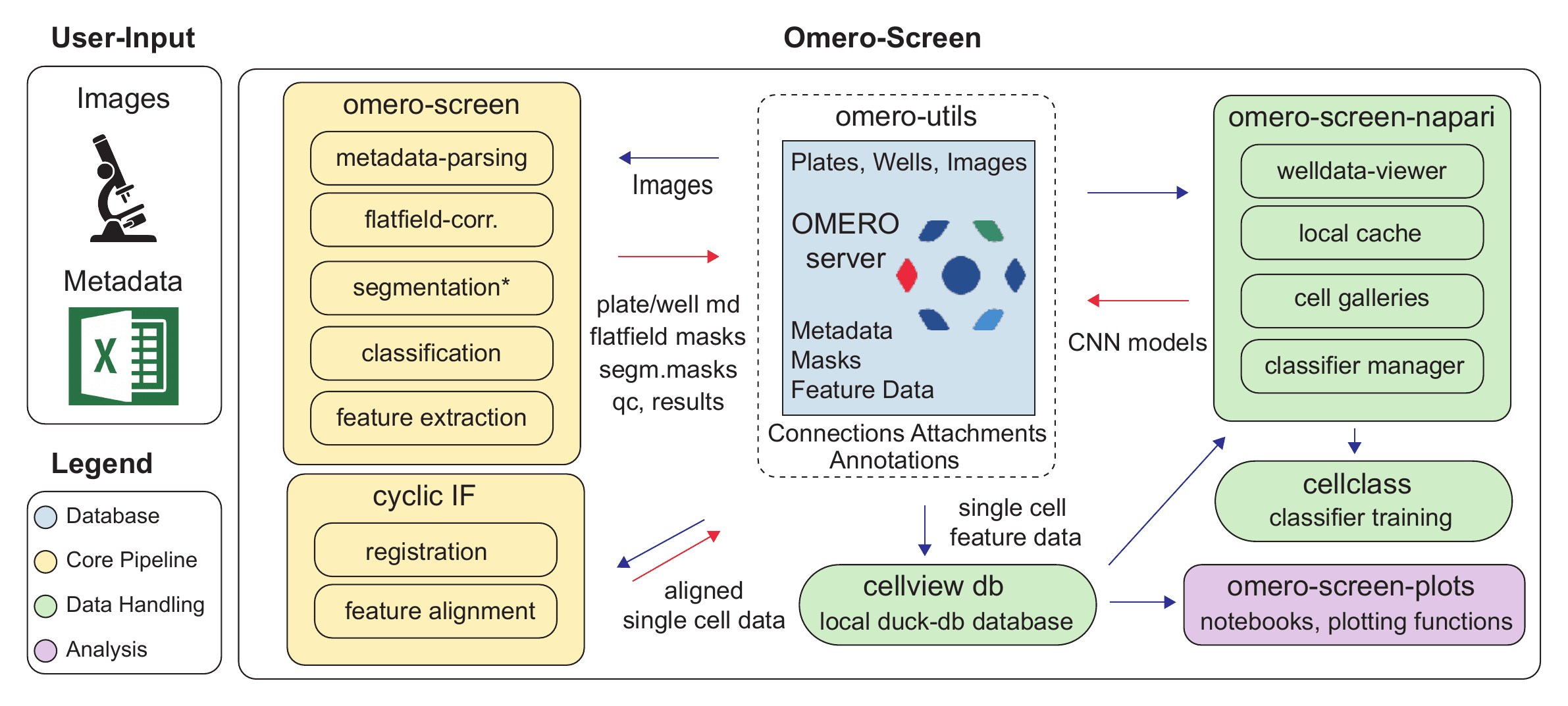
OMERO-Screen is a set of packages in one workspace: the core pipeline, a single-cell database (CellView), napari widgets for browsing plates and labelling cells, classifier training (cellclass), publication plots, and shared OMERO utilities.
Install
On macOS and Linux, one line installs the latest release and walks you through connecting to your OMERO server. Your password is stored in the system keychain.
curl -LsSf https://raw.githubusercontent.com/HocheggerLab/omero-screen/main/install.sh | sh
The installer runs omero-screen setup and omero-screen doctor to check that everything works. Then analyse a plate and pull the results into the local database:
omero-screen 1234 --stitch     # segment a plate, write results back to OMERO
cellview import plate 1234     # pull the measurements into a local database
For development, install from source with uv:
git clone https://github.com/HocheggerLab/omero-screen.git
cd omero-screen
uv sync --dev
uv run omero-screen doctor
OMERO-Screen needs Python 3.12–3.14 (uv handles this) and has not been tested on Windows. The documentation covers HPC use, running a local OMERO server with Docker, 4i experiments and tracking.
Working with Claude
In the Claude desktop app, go to Customize → Plugins → Add marketplace, paste HocheggerLab/omero-screen and install the OMERO-Screen plugin. Then just ask, for example:
Analyse the data from omero-screen plate 4054, create a directory with the analysis on the desktop and summarise your findings in a PowerPoint presentation.
Claude runs the pipeline, queries the database and makes the figures, and asks before it changes anything on OMERO.
Example: High-Content Ploidy Analysis
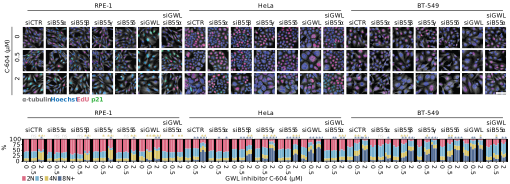
Single-cell segmentation, feature extraction and quantitative measurements combine to identify and characterise cells with different DNA content. Data from Zach et al. 2025.
Status
OMERO-Screen is open source (MIT) and in active development, with a stable release planned for later in 2026. Pin a commit if you need an analysis to stay reproducible. A paper is in preparation; until then, please cite the GitHub repository.